Written, not pasted
Pasting and dropping text are blocked, and so are voice dictation and other input that does not come from the keyboard. Every attempt is recorded.

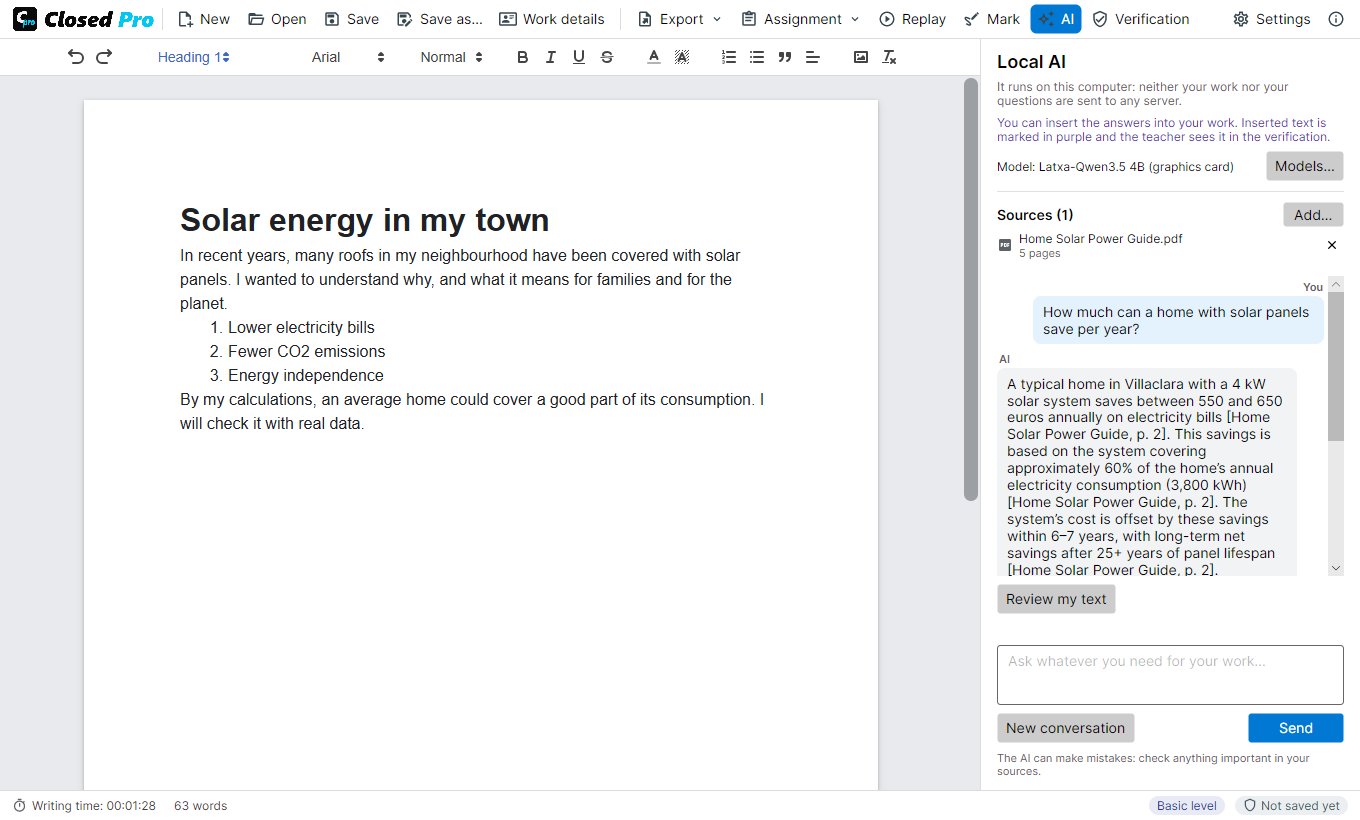
Closed Pro is Closed Lite with an AI tutor. Students write as usual and cannot paste or dictate, but they can ask a local AI for help: it explains, suggests ideas, reviews their text and answers with their sources, citing the page. The teacher decides in a signed assignment what the AI may do, and the whole conversation goes inside the submission, with the writing record and the replay. The AI runs on the computer: no servers and no accounts.
Banning AI does not work, and AI detectors guess and get it wrong. Used well, AI helps students understand, organise their ideas and improve their writing; used badly, it writes the work for them.
Closed Pro puts AI inside the word processor and in plain sight. The teacher decides what it may do, the student uses it while writing, and the submission carries the text, how it was written and every question and answer. The teacher sees how the AI was used and decides with facts.
Pasting and dropping text are blocked, and so are voice dictation and other input that does not come from the keyboard. Every attempt is recorded.
Ask while you write: it explains, suggests ideas and reviews your text. The model runs on the computer: neither the work nor the questions are sent to any server.
Add your notes, readings or articles. The AI answers with them and Closed Pro writes the source and page of every fact.
A signed assignment with the statement, the materials and what the AI may do: explain, give ideas, review, write, or nothing at all.
Every change with its time, every question to the AI with its answer, and any AI text inserted, marked in purple.
Each document is signed when saved, as a .closedpro file or as a PDF that carries it inside. The teacher replays the writing like a video and gets a PDF report with the AI conversation.
And also: the replay at up to ×100, three security levels with digital certificates, hand-in PDFs for Moodle, Classroom or Teams that the teacher marks on screen, export to Word or text, and it opens and verifies the work done with Closed Lite. See every feature →
Open AI models with licences that allow commercial use, run with llama.cpp on the computer. Documents are signed with ECDSA P-256 and, with a certificate, with standard CMS/CAdES signatures.